
N/A
Avg Rating
1
Downloads
Gallery
1 / 6
About
Chatrelay
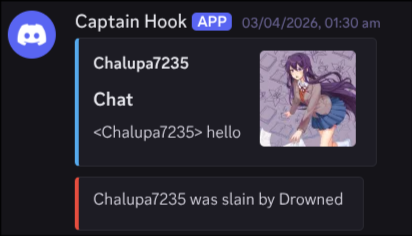
A small plugin that renders minecraft chat, joins, quits, and deaths as images and sends them to a Discord webhook
It preserves minecraft colors and formatting while keeping text readable
setup
-
Take the .whl file from the latest release and put it into the server’s plugins/ folder
-
Start the server once, then (optionally) close it
- This creates the config file
- Open plugins/ChatRelay/config.yml and set it like this:
- webhook_url: Your discord webhook URL ("https://discord.com/api/webhooks/...")
- font_path: Full path to your font ("/full/path/to/your/font.ttf") (the one I used)
- ...and then set everything else to your liking
- Start the server again, and it will load. Otherwise, the logs will tell you why it didn't!
Comments
Sign in with GitHub to join the discussion.
Loading comments...
Installation Tips
Security Note
- Always download from trusted release sources.
- Review changelogs before updating production servers.
- Test plugins in staging before deploying live.
- Keep backups before major plugin upgrades.